Verifying your tracking with the click-test tool
Fire a test click and confirm the edge sees it — before you spend a rupee on real traffic.
Updated 2026-06-09
Before you open a campaign to live publishers, prove the whole pipeline works: click → edge → conversion → payout. The click-test tool does this without asking a publisher to send real traffic. It's the single best ten minutes you can spend on day one.
You'll find it under Payouts & tracking → Test tracking.
What it does
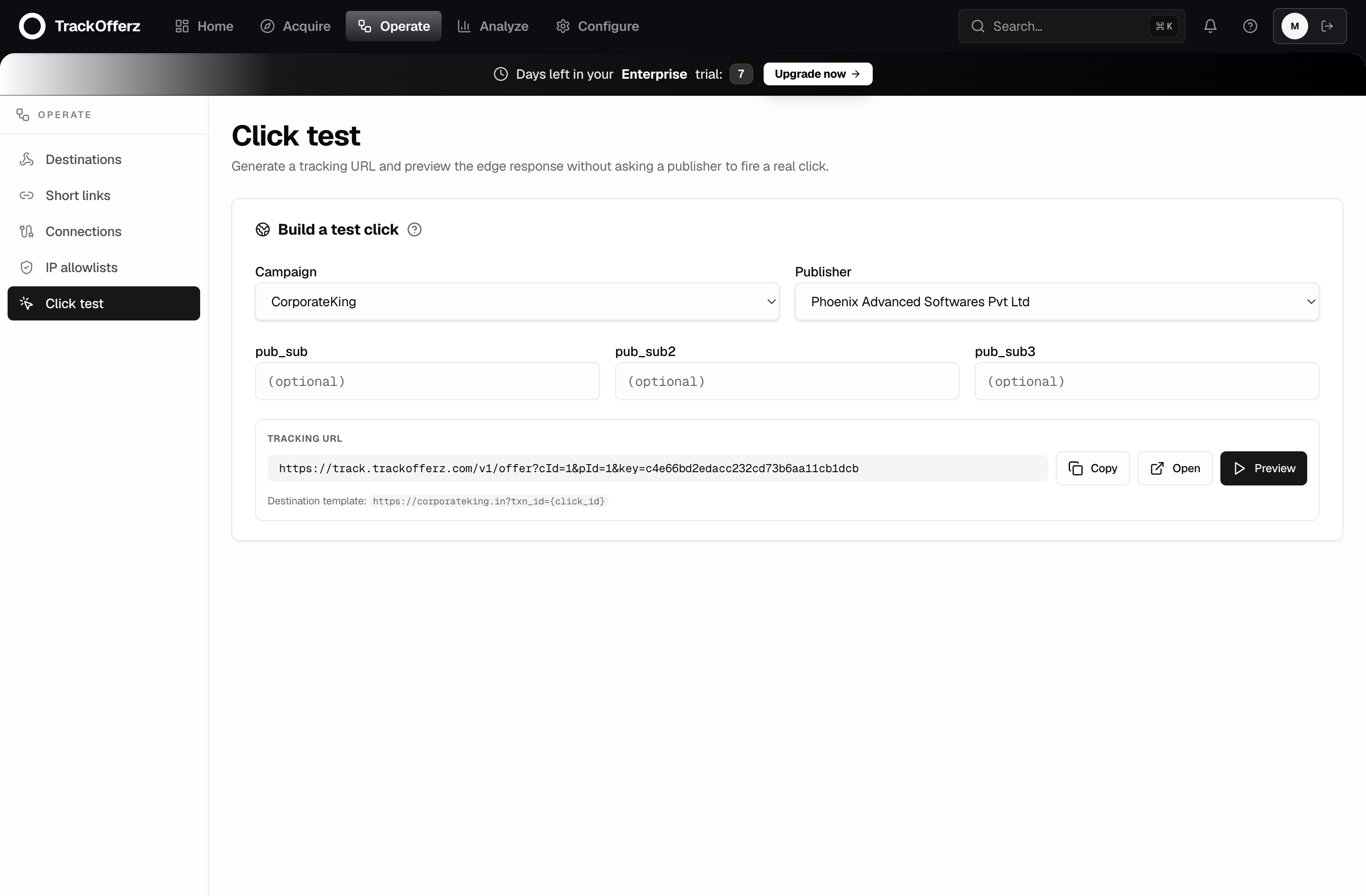
The tool builds the canonical tracking URL for a real campaign + publisher pairing, then lets you exercise it three ways — without leaving the panel.
- Pick a campaign. Only active campaigns appear in the list.
- Pick a publisher. Only approved publishers with a generated tracking key appear — these are the two things a real click needs.
- (Optional) Fill
pub_sub,pub_sub2,pub_sub3. These sub-ID fields pass straight through the click so you can confirm your downstream reports break out by them. - The tool assembles the Tracking URL against your network's edge host (or your custom tracking domain, if you've verified one), and shows the destination template it will redirect to.
Three ways to test
Once the URL is built, you get three actions:
| Action | What happens |
|---|---|
| Copy | Copies the tracking URL to your clipboard so you can paste it anywhere. |
| Open | Fires a real click in a new tab — exercises the full edge pipeline end to end, just like a publisher. |
| Preview | Fetches the URL server-side and shows you the raw edge response — reject codes, fraud score, and the redirect target — without leaving the page. |
Use Preview first. It surfaces the edge's decision (accepted, rejected, fraud-flagged) and the Location it would redirect to, so you can confirm the destination URL is correct before firing a real click.
Test a conversion without the advertiser
After Preview succeeds, a Send test conversion step appears. Pick one of the campaign's events and send it: the postback goes through every real check (click lookup, event name, pricing) and is recorded as a test — status Rejected, never paid, billed or sent to the publisher. You'll see it in Reports → Conversion detail filtered to Rejected.
If it says the redirect doesn't carry a click id, add a parameter such as &click_id={click_id} to the campaign's redirect URL — without it the advertiser can't send conversions back.
A complete end-to-end test
To prove conversions and payouts — not just clicks — run the full loop:
- In the click-test tool, Open the tracking URL. This registers a real click at the edge.
- On the page you land on, complete whatever counts as a conversion (or fire your postback manually with the click's transaction ID).
- Go to Reports. Within a few seconds the click — and then the conversion — appears.
- Confirm the payout calculated correctly against the campaign's payout terms.
If the click shows but the conversion doesn't, the issue is almost always the postback URL on the advertiser side — check that the advertiser is firing the postback with the correct transaction-ID macro.
Common results and what they mean
- Accepted → redirect to destination — everything works. You're ready for live traffic.
- Rejected: campaign not active — the campaign is paused or outside its schedule. Activate it first.
- Rejected: publisher not approved — the publisher isn't approved on this campaign yet. Approve them under Campaigns → Publishers.
- Fraud-flagged — the edge's inline fraud rules caught something (often a datacenter IP or a repeated fingerprint during testing). This is expected when you click-test repeatedly from the same machine; real traffic won't trip it the same way.
Once your click-test passes cleanly, you're ready to read your reports and watch live traffic come in.